AI Meal Plan Generatorfor Coaches
Build client-ready macro meal plans in minutes. Turn your client's goals, exact macro targets and food preferences into a personalized, branded plan you review, edit and send. Max handles routine swaps and restaurant guidance while you stay in control of the coaching.
14-day trial · No credit card · Use it with a real client
Real customer results · Summit Athletic Club, St. George UT
80+
Client plans centralized
5–10 min
Per client-ready plan
5+ hrs
Saved per coach each week
Also serving weight-loss programs and wellness centers. Deliver personalized nutrition support between appointments.
The shift
Stop rebuilding nutrition plans by hand.
- ·Spreadsheets and scattered notes
- ·Manual macro recalculation
- ·Generic PDFs
- ·Repetitive client questions
- ·30–60 minute plan edits
- One organized client profile
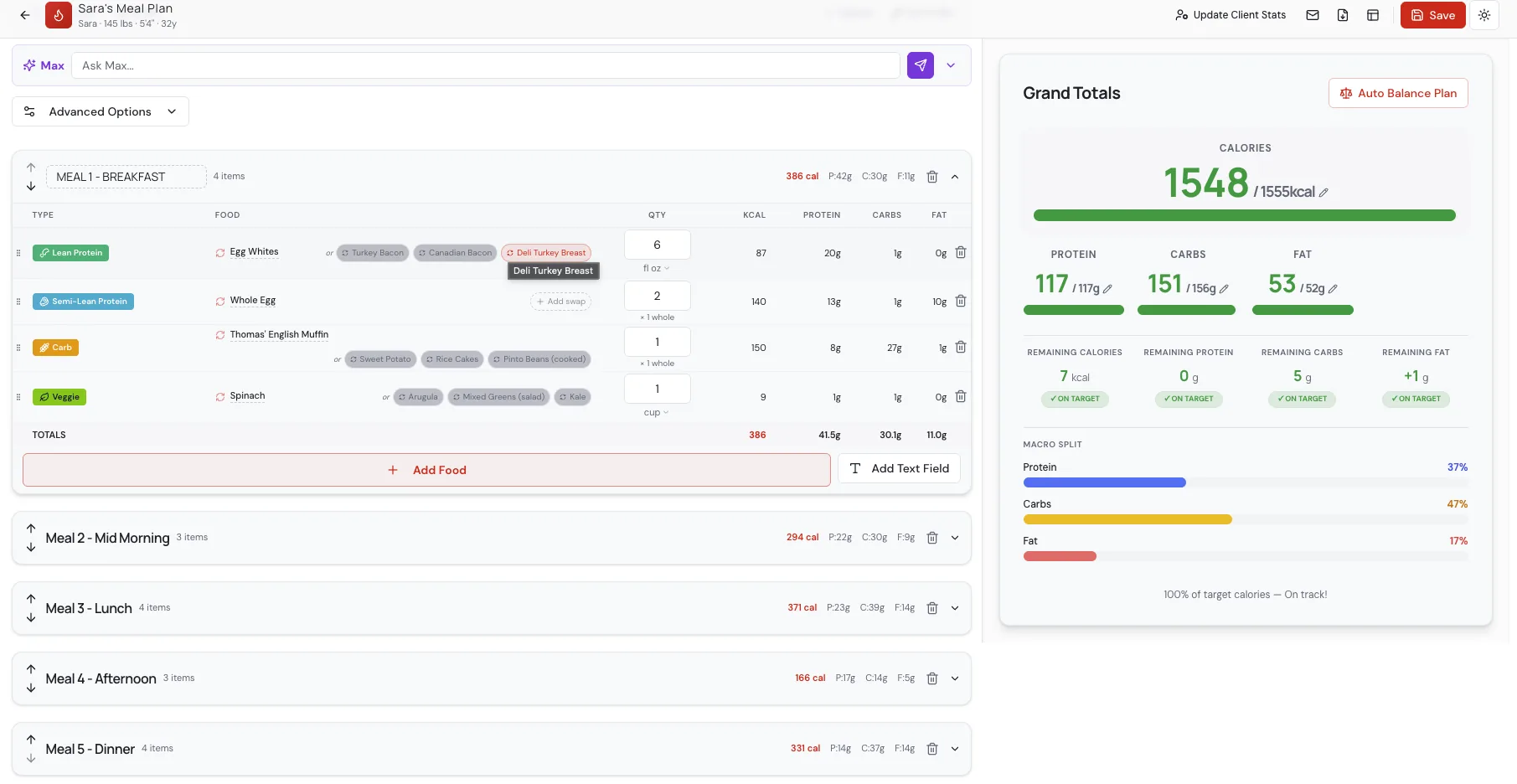
- AI-generated macro plan draft in under 2 minutes
- Fast coach-controlled edits
- Branded PDF delivery
- Max supporting clients between sessions
How it works
From client intake to a finished plan in minutes.
Add goals and preferences
Enter weight, activity, goals, allergies and food preferences. TDEE and macro math are automatic.
Generate and review with Max
Max drafts a full macro-accurate day in under 2 minutes. Review, tweak servings in 0.25 increments, and swap foods with one tap.
Brand, export and deliver
One-click branded PDF with your logo and coaching notes. Clients open their plan on any phone — no app, no login.
Built for both sides
Coach control. Client convenience.
Less time on plan admin
- Generate accurate macro plan drafts in under 2 minutes
- Customize every food and serving before delivery
- Keep client goals, macros and history organized
- Export professional branded PDFs
Support between sessions
- No app download or login required
- Ask about food swaps and get macro-matched options
- Get restaurant guidance for real menus
- Plan-aware support through Max, 24/7
Customer Story · Summit Athletic Club
From 2.5 hours per plan to 5–10 minutes.
Summit Athletic Club in St. George, UT centralized 80+ client plans in MacroFuel while continuing to use Trainerize with their clients. Plan creation dropped from about 2.5 hours per client to 5–10 minutes, edits now take about five minutes, and each coach saves 5+ hours per week.
80+
Client plans
5–10 min
Client-ready plan
~5 min
Plan edits
"Whether I'm grabbing food at a gas station or sitting down at a restaurant, the app tells me exactly what fits my goals."
Fits your existing coaching stack
Already using Trainerize? Keep using it.
Build and brand the nutrition plan in MacroFuel, export the finished PDF, and add it directly to your client's Trainerize profile. Summit Athletic Club uses this workflow to manage 80+ client plans without replacing the coaching platform its team already knows.
- No need to migrate your entire coaching business
- Export a professional branded PDF
- Upload it directly to the client's Trainerize profile
- Use MacroFuel as the specialized nutrition layer
Works alongside Trainerize — MacroFuel is not a native Trainerize integration or automatic sync.
The Summit workflow
- 1
Create the nutrition plan in MacroFuel
Enter goals, macros, and preferences. Max drafts a full macro-accurate day in under 2 minutes.
- 2
Customize and brand it
Swap foods, adjust servings, add coaching notes. About 5–10 minutes per client-ready plan.
- 3
Export the branded PDF
One click for a professional PDF with your logo and coaching notes.
- 4
Upload to the client's Trainerize profile
Your client opens the MacroFuel plan inside the coaching platform they already use.
What makes it different
Built for coaches — not consumer food tracking.
Macro-first planning
Prescribe the day, don't track it after the fact.
Coach review and control
Every plan goes out only after you approve it.
Branded delivery
Your logo, colors and coaching notes on every PDF.
Fast plan adjustments
Swap a food, macros rebalance — no rebuild.
Plan-aware client support
Max answers questions with the actual plan in context.
Pricing
Simple, honest pricing.
Plans start at $29/month. Every plan starts with a 14-day free trial — no credit card required.
Starter
For coaches getting their first clients onto MacroFuel.
- 1 coach seat
- 5 active clients included
- AI meal plan generator with Max
- Max client portal included
Solo
For established solo coaches growing their nutrition service.
- 1 coach seat
- 15 active clients included
- Everything in Starter
- Client engagement insights
Pro
For growing coaching teams and high-volume coaches.
- 3 coach seats
- 50 active clients included
- Everything in Solo
- Extra clients $2/mo · extra coaches $20/mo
- Max usage analytics included
Gym / Team
For gyms, studios and multi-location coaching businesses.
- Custom coach-seat volume
- Custom active-client volume
- Everything in Pro
- Sales-assisted onboarding
- White-label branding
FAQ
Common questions before you start
- Does MacroFuel replace the coach?
- No. Max drafts plans, handles food swaps, and answers restaurant questions between sessions, but the coach reviews every plan, owns the strategy, and keeps the client relationship. MacroFuel gives coaches leverage — it doesn't replace them.
- Can I customize every plan?
- Yes. Max drafts the plan in under 2 minutes and you edit anything — swap foods, adjust portions in 0.25 increments, add coaching notes, rearrange meals. A client-ready plan takes minutes end to end.
- Do clients need to download an app?
- No. Clients open their branded plan on any phone through a mobile web link and chat with Max in the same place. No app store, no login, no friction.
- Can I use MacroFuel alongside Trainerize?
- Yes. MacroFuel works alongside Trainerize as the specialized nutrition layer for your coaching stack. Coaches build and brand the plan in MacroFuel, export the finished PDF, and upload it directly to the client's Trainerize profile. Summit Athletic Club uses this workflow to manage 80+ client plans without replacing the coaching platform their team already knows. This is not a native Trainerize integration or automatic sync.
- What happens after the 14-day trial?
- After 14 days you're prompted to add payment. If you don't, your account is paused (not deleted) and your data stays safe for 30 days so you can resume any time.
- Is there a free plan?
- No. Every plan starts with a 14-day free trial — no credit card required. After the trial, plans start at $29/month for five active clients.
- What counts as an active client?
- Any client currently on a live meal plan. Archived clients don't count toward your plan limit.
See Max generate a meal-plan draft in under 2 minutes
No signup. Watch a real coach workflow end-to-end — client setup, AI plan draft with Max, coach review, branded PDF, sent in one click.
Turn client goals into a complete meal plan in minutes —not this weekend.
Start your 14-day trial. Build a real plan for a real client. Keep it after the trial.
14 days · No credit card required